

If you want to display numbers using fewer GPIO pins on your ESP32, a shift register-based 7 segment display is one of the best beginner projects. Instead of connecting each segment directly, you can control all segments using just three pins. In this project, we use an ESP32 with a shift register (like 74HC595) and simulate everything using Wokwi. This approach helps you understand both hardware interfacing and embedded programming without needing physical components
Project Overview
This project displays numbers from 0 to 9 on a 7-segment display using a shift register.
Why Use a Shift Register?
A 7-segment display needs 7 or 8 pins, but ESP32 GPIO pins are limited. A shift register solves this problem by allowing you to control multiple outputs using only 3 pins:
- Data Pin
- Clock Pin
- Latch Pin
Components Used
- ESP32
- 7-Segment Display
- 74HC595 Shift Register
- Resistors (for segments)
- Jumper wires (virtual in Wokwi)
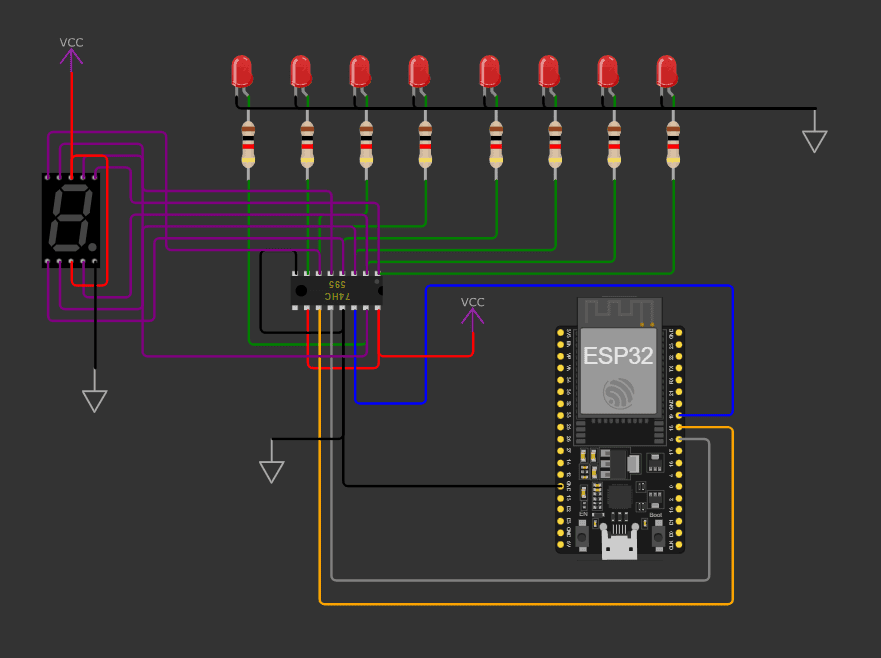
Pin Configuration
In your code, you defined:
const int latchPin = 5;
const int clockPin = 18;
const int dataPin  = 19;
What These Pins Do
- Latch Pin (5): Updates the output (shows data on display)
- Clock Pin (18): Sends timing pulses
- Data Pin (19): Sends binary data (ON/OFF for segments)
This is the core communication method between ESP32 and the shift register.
How the Code Works
1. Setup Function
void setup() {
  Serial.begin(115200);
  pinMode(latchPin, OUTPUT);
  pinMode(clockPin, OUTPUT);
  pinMode(dataPin, OUTPUT);
}
Here, we initialize serial communication and set all control pins as outputs.
2. Sending Data to Display
The key function used here is:
shiftOut(dataPin, clockPin, LSBFIRST, ledPattern);
This function sends 8-bit data to the shift register. Each bit controls one segment of the display.
3. Displaying Numbers (0–9)
Each number is represented using a binary pattern:
byte ledPattern = B00000010; // 0
This binary value determines which segments turn ON or OFF.
For example:
- B00000010 → displays 0
- B10011111 → displays 1
- B00100101 → displays 2
Each pattern corresponds to specific segments (a, b, c, d, e, f, g).
4. Latch Mechanism
digitalWrite(latchPin, LOW);
shiftOut(dataPin, clockPin, LSBFIRST, ledPattern);
digitalWrite(latchPin, HIGH);
This sequence ensures:
- Data is sent
- Output is updated only after complete transmission
This avoids flickering or incorrect display.
5. Loop Execution
Your loop displays numbers from 0 to 9 with a 1-second delay:
delay(1000);
This creates a simple counting display system.
Full Project Code
Writing
const int latchPin =5;
const int clockPin =18;
const int dataPin =19;

void setup() {
Serial.begin(115200);
pinMode(latchPin, OUTPUT);
pinMode(clockPin, OUTPUT);
pinMode(dataPin, OUTPUT);
}

void loop() {
byte ledPattern= B00000010;

digitalWrite(latchPin, LOW);
shiftOut(dataPin, clockPin, LSBFIRST, ledPattern);
digitalWrite(latchPin, HIGH);
delay(1000);

ledPattern = B10011111;
digitalWrite(latchPin, LOW);
shiftOut(dataPin, clockPin, LSBFIRST, ledPattern);
digitalWrite(latchPin, HIGH);
delay(1000);

ledPattern = B00100101;
digitalWrite(latchPin, LOW);
shiftOut(dataPin, clockPin, LSBFIRST, ledPattern);
digitalWrite(latchPin, HIGH);
delay(1000);

ledPattern = B00001100;
digitalWrite(latchPin, LOW);
shiftOut(dataPin, clockPin, LSBFIRST, ledPattern);
digitalWrite(latchPin, HIGH);
delay(1000);

ledPattern = B10011000;
digitalWrite(latchPin, LOW);
shiftOut(dataPin, clockPin, LSBFIRST, ledPattern);
digitalWrite(latchPin, HIGH);
delay(1000);

ledPattern = B01001000;
digitalWrite(latchPin, LOW);
shiftOut(dataPin, clockPin, LSBFIRST, ledPattern);
digitalWrite(latchPin, HIGH);
delay(1000);

ledPattern = B01000000;
digitalWrite(latchPin, LOW);
shiftOut(dataPin, clockPin, LSBFIRST, ledPattern);
digitalWrite(latchPin, HIGH);
delay(1000);

ledPattern = B00011111;
digitalWrite(latchPin, LOW);
shiftOut(dataPin, clockPin, LSBFIRST, ledPattern);
digitalWrite(latchPin, HIGH);
delay(1000);

ledPattern = B00000000;
digitalWrite(latchPin, LOW);
shiftOut(dataPin, clockPin, LSBFIRST, ledPattern);
digitalWrite(latchPin, HIGH);
delay(1000);

ledPattern = B00001000;
digitalWrite(latchPin, LOW);
shiftOut(dataPin, clockPin, LSBFIRST, ledPattern);
digitalWrite(latchPin, HIGH);
delay(1000);
}
Real-World Applications
This type of system is used in many real devices:
- Digital clocks
- Counters (people, products)
- Scoreboards
- Industrial displays
Once you understand this project, you can easily expand it to multiple digits using more shift registers.
Pro Tips for Improvement
- Use an array instead of repeating code (cleaner code)
- Add buttons to control counting
- Convert this into a 4-digit display system
- Integrate with sensors (temperature display, etc.)
View Full Project on Wokwi – Follow This Link
Final Thoughts
This ESP32 7-segment display project is a perfect example of how you can control multiple outputs efficiently using a shift register. By using Wokwi, you can simulate and test everything before building the real hardware.
If you are serious about embedded systems, mastering this concept will help you build more advanced display-based projects in the future.