Introduction
Printed Circuit Board (PCB) design is a core skill in modern electronics, from simple Arduino projects to complex industrial systems. Whether you’re a student, hobbyist, or professional engineer, choosing the right PCB design software can significantly impact your productivity and learning speed. In this guide, we’ll explore the best PCB design tools available in 2026, explaining their features, strengths, and real-world usage.
Why PCB Design Software Matters
PCB design software helps you convert circuit ideas into real, manufacturable boards. Instead of manually wiring components, these tools allow you to design schematics, route connections, and simulate circuits digitally. This reduces errors, saves cost, and improves efficiency. For example, when designing a microcontroller-based system, proper PCB layout ensures stable power delivery and minimal noise interference.
1. KiCad (Best Free Option)

KiCad is a powerful open-source PCB design software widely used by students and professionals. It offers schematic capture, PCB layout, and even 3D visualization of your board.
One of the biggest advantages of KiCad is that it is completely free with no limitations, making it ideal for beginners. At the same time, it supports advanced features like multi-layer boards, which are used in real-world electronics products. For example, you can design an ESP32-based IoT board and export it directly for manufacturing.
Pros
- Completely free & open-source (no license limits)
- Supports unlimited layers and board size
- Powerful features (push-shove routing, differential pairs)
- Works offline + full control of files
- Growing industry adoption (even used by companies)
Cons
- UI not as polished as paid tools
- Steeper learning curve for beginners
- Limited built-in simulation vs others
👉 Best for: Freelancers, students, professionals who want FREE + powerful
2. Altium Designer (Industry Standard)

Altium Designer is considered one of the most powerful PCB design tools used in industry. It provides a highly integrated environment for schematic design, PCB layout, and simulation.
Professionals prefer Altium because of its advanced routing tools and real-time design rule checking. This helps prevent errors before manufacturing. For example, companies designing high-speed communication boards rely on Altium to manage signal integrity and complex layouts.
However, it is expensive, so it is more suitable for professionals or companies rather than students.
Pros
- Industry-standard tool (used in companies)
- Advanced features: signal integrity, high-speed design
- Excellent auto-routing & design tools
- Strong collaboration (Altium 365 cloud)
Cons
- Very expensive (~$2000+/year)
- Steep learning curve
- Overkill for small/simple projects
👉 Best for: Industry jobs, high-end PCB design
3. Eagle (Balanced Choice)
Eagle (by Autodesk) is a well-known PCB design software that offers a balance between ease of use and powerful features. It is especially popular among hobbyists and small startups.
Eagle provides a simple interface and integrates well with other Autodesk tools. For instance, you can design a PCB and directly connect it with mechanical designs in Fusion 360. This is useful when building compact electronic products like wearable devices.
Pros
- Easy to learn (good UI for beginners)
- Strong community + tutorials
- Integration with Autodesk ecosystem
Cons
- Free version has serious limitations (layers, size)
- Subscription model (not fully free)
- Being phased into Fusion 360 (uncertain future)
👉 Best for: Hobbyists (but declining popularity)
4. EasyEDA (Best Online Tool)

EasyEDA is a browser-based PCB design tool, meaning you don’t need to install any software. It is perfect for beginners who want to start quickly.
One major advantage is its integration with PCB manufacturing services, allowing you to design and order your board in one place. For example, you can design a simple amplifier circuit and send it for fabrication within minutes.
Pros
- Very easy for beginners
- Works in browser (no install)
- Huge component library (LCSC integration)
- One-click PCB ordering (JLCPCB)
Cons
- Requires internet (limited offline use)
- Vendor lock-in risk (JLCPCB ecosystem)
- Not ideal for complex/high-speed designs
👉 Best for: Beginners, fast prototyping, quick freelance jobs
5. Proteus (Best for Simulation + Design)
Proteus is widely used in education because it combines simulation and PCB design in one platform. You can test your circuit before building it physically.
This is extremely useful when working with microcontrollers. For example, you can simulate an Arduino project with sensors and verify the output before creating the PCB. This reduces debugging time and hardware errors.
Pros
- Excellent simulation (especially microcontrollers)
- Can simulate code + hardware together
- Great for testing before building
Cons
- Not as strong for real PCB manufacturing
- Paid software
- PCB tools less advanced than KiCad/Altium
👉 Best for: Simulation, student projects, embedded testing
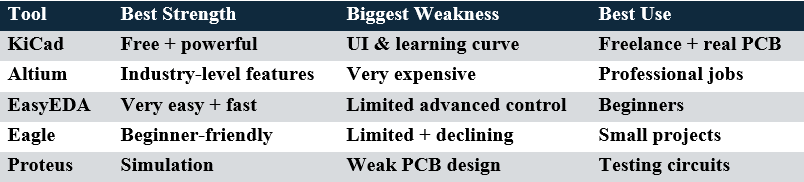
Comparison Between PCB Design Softwares
Free vs Paid PCB Software – Which Should You Choose?
If you are just starting out, free tools like KiCad or EasyEDA are more than enough to learn PCB design and even build real projects. They provide all the essential features without any cost.On the other hand, if you plan to work in industry or handle complex designs, learning tools like Altium Designer will give you a competitive advantage. Many companies expect familiarity with professional-grade software.
Final Thoughts
Choosing the right PCB design software depends on your goals. Beginners should focus on learning concepts using simple and free tools, while professionals should invest in advanced platforms for better performance and precision.
A smart approach is to start with KiCad or EasyEDA, build real projects, and then move to advanced tools like Altium Designer as your skills grow. This step-by-step learning path will make you confident in both academic and industry-level PCB design.