

Introduction
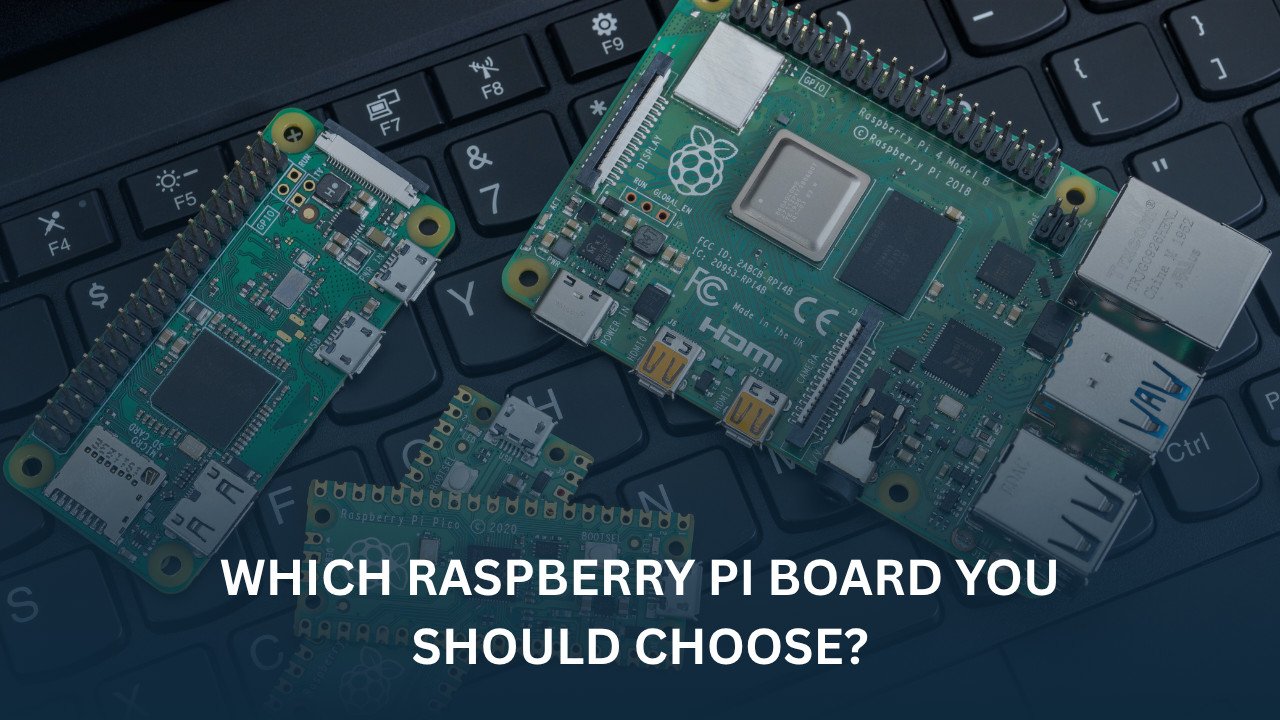
If you are new to Raspberry Pi, choosing the right model can feel confusing. You might see names such as Raspberry Pi 5, Raspberry Pi 4, Raspberry Pi Zero 2 W, and Raspberry Pi Pico and wonder which raspberry pi is right for your project.
The good news is that each Raspberry Pi model is designed for a specific purpose. Some models are powerful enough to replace a basic desktop computer, while others are built for small IoT devices, robots, or battery-powered projects.
As an Electrical and Electronics Engineer, I have noticed that many students and hobbyists buy a Raspberry Pi without fully understanding what they need. This often leads to spending more money than necessary or choosing a board that does not fit the project requirements.
In this guide, we will explore the major Raspberry Pi models, compare their features, and help you choose the best option for your next project.
What Is a Raspberry Pi?
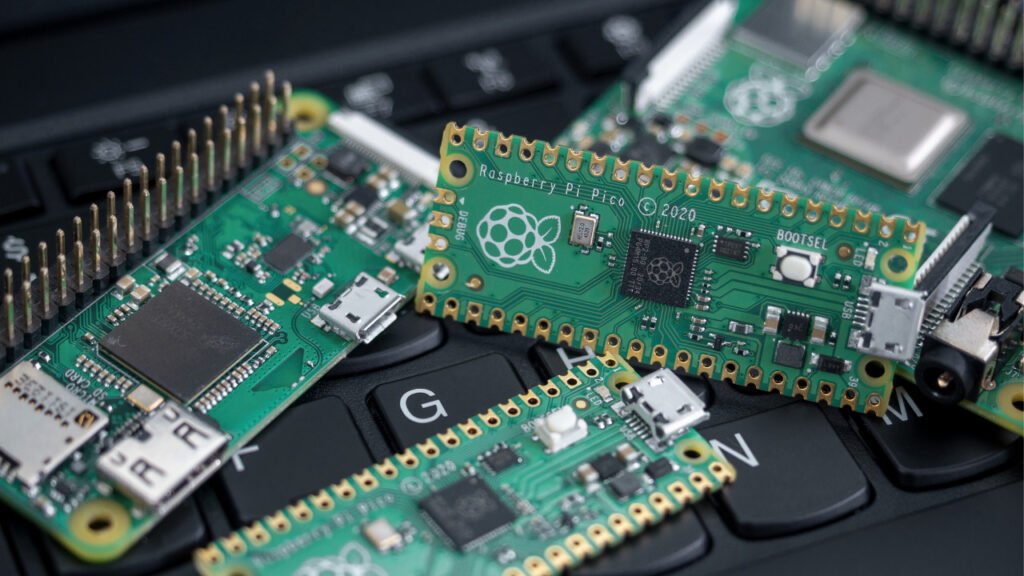
A Raspberry Pi is a small single-board computer (SBC) that can perform many of the tasks of a traditional computer. It runs an operating system, connects to a monitor, keyboard, and mouse, and can be programmed using languages such as Python and C++.
Unlike a desktop PC, a Raspberry Pi also provides General Purpose Input/Output (GPIO) pins. These pins allow you to connect sensors, motors, displays, and other electronic components directly to the board.
Today, Raspberry Pi devices are used in:
- Robotics
- Home automation
- IoT systems
- Industrial monitoring
- Programming education
- Media centers
- AI and computer vision projects
Understanding Raspberry Pi Families
Before looking at individual models, it helps to understand the different Raspberry Pi families.
Raspberry Pi Family Overview
Raspberry Pi
│
├── Main Boards
│   ├── Raspberry Pi 5
│   ├── Raspberry Pi 4
│   └── Raspberry Pi 3
│
├── Zero Series
│   ├── Zero 2 W
│   └── Zero W
│
├── Pico Series
│   ├── Pico 2
│   └── Pico W
│
└── Compute Modules
    └── Industrial Applications
Each family serves a different purpose.
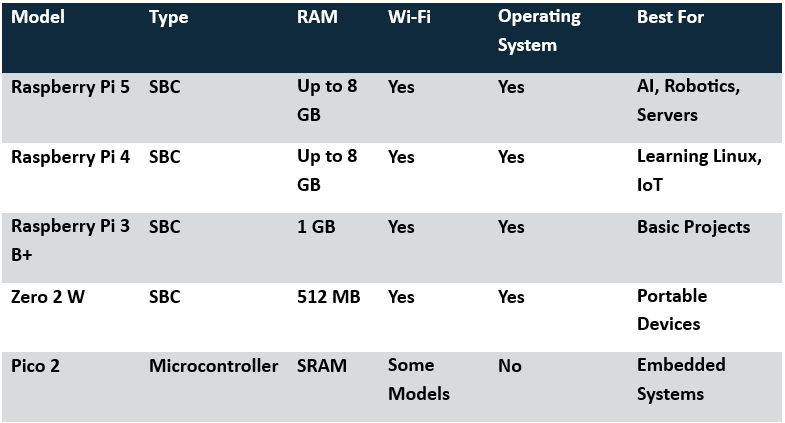
The Main Board series focuses on performance and versatility. The Zero series is designed for compact and low-power applications. The Pico series is a microcontroller platform rather than a full computer. Compute Modules are intended for commercial and industrial products.
Raspberry Pi Models Explained
Raspberry Pi 5
The Raspberry Pi 5 is currently the most powerful Raspberry Pi board available. It offers a significant performance improvement over previous generations and is suitable for demanding applications.
Key Features
- Quad-core 64-bit processor
- Up to 8 GB RAM
- Dual 4K display support
- PCIe connectivity
- Faster USB and storage performance
- Improved graphics processing
Best Use Cases
- Robotics
- AI projects
- Computer vision
- Home servers
- Software development
- Advanced Linux learning
Advantages
The Raspberry Pi 5 delivers desktop-like performance for many tasks. Programs load faster, multitasking feels smoother, and hardware interfaces respond more quickly.
Limitations
It consumes more power than smaller Raspberry Pi models and typically requires active cooling for demanding workloads.
Raspberry Pi 4 Model B
The Raspberry Pi 4 remains one of the most popular models because it provides a good balance between performance and price.
Key Features
- Quad-core Cortex-A72 processor
- Up to 8 GB RAM
- Dual monitor support
- Gigabit Ethernet
- USB 3.0 ports
Best Use Cases
- Learning Linux
- Web servers
- Media centers
- Home automation systems
- Programming projects
Advantages
The Raspberry Pi 4 is powerful enough for most educational and hobby projects while remaining affordable.
Limitations
It is slower than the Raspberry Pi 5, especially when handling multiple applications simultaneously.
Raspberry Pi 3 Model B+
Although older, the Raspberry Pi 3 B+ is still used in many projects.
Key Features
- Quad-core processor
- Built-in Wi-Fi
- Bluetooth connectivity
- Standard GPIO interface
Best Use Cases
- Educational projects
- Basic IoT systems
- Simple automation tasks
Advantages
Low cost and strong community support.
Limitations
Limited performance compared to modern Raspberry Pi models.
Raspberry Pi Zero 2 W
The Raspberry Pi Zero 2 W is designed for projects where space and power consumption matter.
Key Features
- Compact size
- Wireless connectivity
- Low power consumption
- GPIO support
Best Use Cases
- Wearable devices
- Portable projects
- Battery-powered systems
- Smart sensors
Advantages
Very small and energy efficient.
Limitations
Fewer ports and lower performance than the Raspberry Pi 4 and Raspberry Pi 5.
Raspberry Pi Pico 2
The Raspberry Pi Pico 2 is different from the models above because it is a microcontroller rather than a full computer.
Key Features
- Extremely low power consumption
- Real-time control
- Fast startup
- Affordable price
Best Use Cases
- Sensor interfacing
- Motor control
- Embedded systems
- Real-time applications
Advantages
Excellent for electronics projects and embedded development.
Limitations
Cannot run a desktop operating system like Raspberry Pi OS.
Raspberry Pi Model Comparison Table
Raspberry Pi 5 vs Raspberry Pi 4
For many readers, this is the most important comparison.
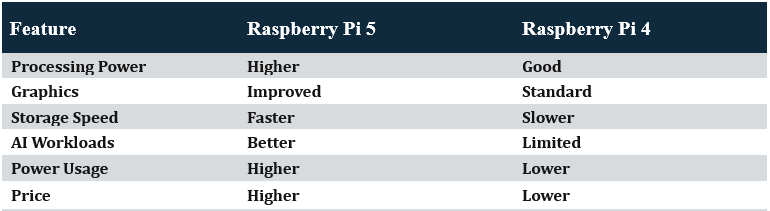
If your budget allows and you plan to work with robotics, AI, or advanced projects, the Raspberry Pi 5 is usually the better choice. For learning Linux, programming, and home automation, the Raspberry Pi 4 remains an excellent option.
Which Raspberry Pi Should You Buy?
For Beginners
Choose Raspberry Pi 4. It offers excellent value and enough performance for most learning projects.
For Robotics
Choose Raspberry Pi 5. The extra processing power helps when handling sensors, cameras, and control algorithms.
For IoT Projects
Choose Raspberry Pi Zero 2 W. It is compact, efficient, and easy to integrate into connected devices.
For Embedded Electronics
Choose Raspberry Pi Pico 2. It provides real-time control and low power consumption.
For AI and Computer Vision
Choose Raspberry Pi 5. It offers the best processing capability among Raspberry Pi boards.
Common Mistakes When Buying a Raspberry Pi
One common mistake is purchasing a Raspberry Pi 5 when a simpler model would work perfectly. Another is confusing the Raspberry Pi Pico with a full Raspberry Pi computer.
Many beginners also forget to budget for accessories such as a power supply, microSD card, cooling solution, keyboard, mouse, and display.
Before buying, think about your project requirements rather than simply choosing the newest model.
Final Thoughts
The best Raspberry Pi depends entirely on your project goals. There is no single model that is perfect for everyone.
If you are just getting started, the Raspberry Pi 4 is often the safest choice. If you need maximum performance, the Raspberry Pi 5 is the clear winner. For compact IoT systems, the Zero 2 W is an excellent option, while the Pico 2 is ideal for embedded electronics and real-time control.
Understanding these differences will help you choose the right board, save money, and build more successful projects.
Explore More About Raspberry Pi
What Is a Raspberry Pi? A Beginner’s Guide to Features, Uses
How to Set Up Raspberry Pi for the First Time: Installing Raspberry Pi OS Step-by-Step
Raspberry Pi 5 is best for advanced robotics because it has higher processing power for cameras, AI, and multiple sensors. Raspberry Pi 4 is also good for medium-level robotics projects.
Yes, Raspberry Pi 4 is still very useful in 2026 for learning, IoT projects, servers, and home automation because it offers a strong balance of price and performance.
Yes, especially Raspberry Pi 5. It can run lightweight AI models, computer vision tasks, and edge computing applications.
Raspberry Pi Zero 2 W is ideal for IoT projects because it is small, low power, and has wireless connectivity.
Yes. You usually need a power supply, microSD card, keyboard, mouse, HDMI cable, and sometimes a cooling system depending on the model.
The Raspberry Pi Zero series is used for small, low-power projects like wearable devices, portable gadgets, smart sensors, and compact IoT systems.
No, the Raspberry Pi Pico is not an SBC. It is a microcontroller designed for embedded systems and hardware control tasks.
No, the Raspberry Pi Pico cannot run a full operating system. It runs a single program directly without an OS.
Pingback: Top Free Online Circuit Simulators for Engineers & Hobbyists (2026) - Elec blog